Summarize
The key points, each with its page.
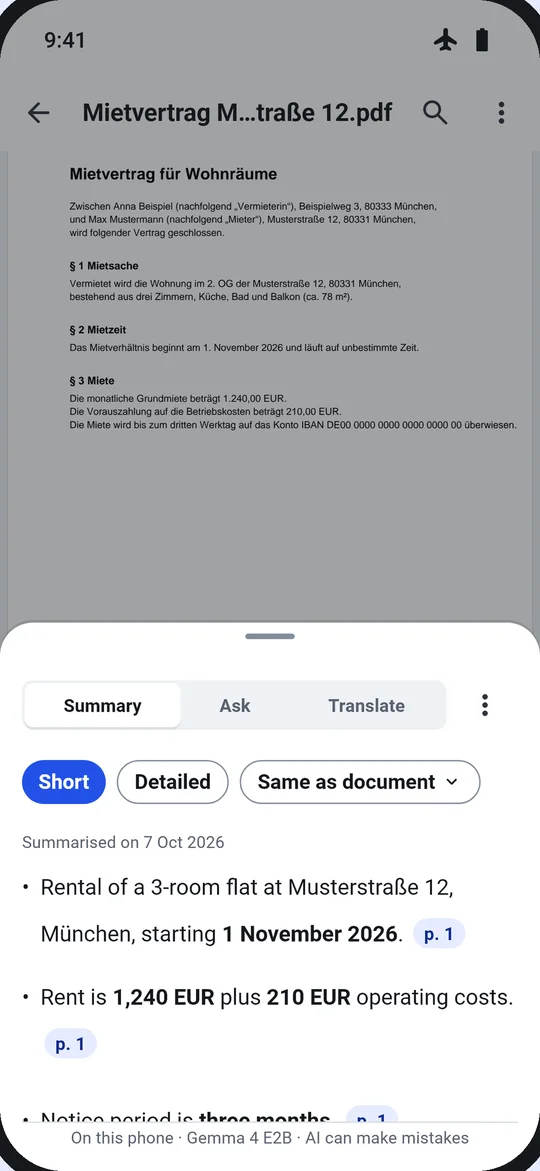
A short or detailed bullet summary, in the document’s language, English or German. Key numbers and dates in bold, and every point links to its page.
- On this phoneProcessed on this phone
- Airplane modeWorks in airplane mode
- No limitsNo size, page or daily limits
- Pro · try it once on a real file · €9.99 one-time
- Length
- Short
- Language
- Document’s
- Model
- On this phone
Check the summary against the page in one tap.
Each bullet links to the page it comes from. Tap it, and the viewer jumps there, so you can read the original words.
- Short or Detailed
- In the document’s language, English or German
- Copy, save as note or text, regenerate
A summary in four steps
- 1Open the document. From a tool tile, Home, a Next chip or another app’s share sheet.
- 2Pick the length. Short or detailed, and the language of the summary.
- 3Let it read. The model on the phone reads the document; nothing is sent anywhere.
- 4Check the points. Tap a point to see its page. Copy or save the summary.
Options
- Length
- Short · Detailed
- Language
- The document’s · English · German
- Model
- On the phone, a one-time 3.1 GB download
Next
The result card suggests the next tool, so jobs chain without going back.
Questions
Is my document sent to an AI service?
No. The AI runs on the phone and reads only the open document. It can make mistakes, so check important details against the document.
What does the AI need?
A one-time download of the model (3.1 GB, over Wi-Fi by default) and a capable phone with about 2–3 GB of free memory. On a phone that can’t run it, the app says so and why.
What about scans?
Scans need text first; the panel offers “Make it searchable”.
Do I need Pro?
You can run it once on a real file and keep the result. After that, Pro unlocks it for good: €9.99, one-time, no subscription.