All tools
SecurityTool 20 of 30 · IncludedDE: PDF unterschreiben
Sign PDF
Your signature, kept for next time.
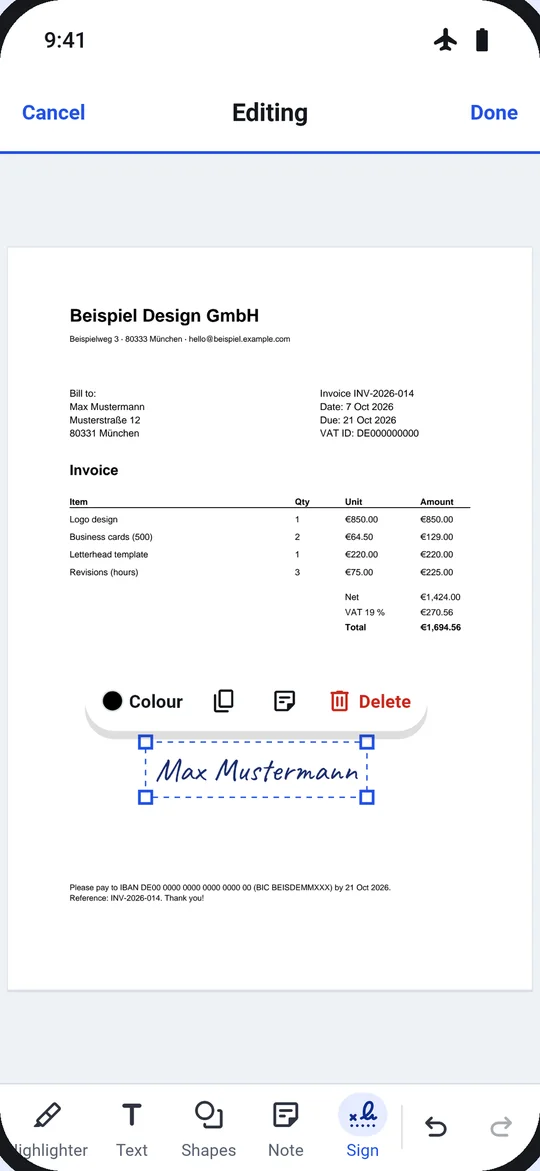
Draw, type or photograph your signature; it is kept on the phone for next time. Place it, resize it, add the date beside it, initials on every page.
- On this phoneProcessed on this phone
- Airplane modeWorks in airplane mode
- No limitsNo size, page or daily limits
SIGN PDF · OPTIONSFICTIONAL FILE
Mietvertrag Musterstraße 12.pdf12 pages · 8.4 MB
- Signature
- Saved
- Date
- Off
- Initials
- Off
ResultSigned on page 3
DoneProcessed on this phone§ 01 · Sign here01 / 05
It shows where to sign.
“Sign here” pills mark the signature fields. Tap one, pick your signature, and it lands in place; Undo takes it off.
- Draw · Type (three handwriting styles) · Photo
- Add date next to signature
- Initials on every page
Your signatures stay on the phone, in Me → Signatures.
§ 02 · How it works02 / 05
A signed PDF in four steps
- 1Choose the file. From Home, Tools, Files, or “Sign with Dokulo” in another app’s share sheet.
- 2Pick your signature. A saved one, or draw, type or photograph a new one.
- 3Place it. Tap a “Sign here” field or anywhere; resize, add the date, initials on every page.
- 4Done. “Signed on page 3 · Undo”, then saved as a new version.
§ 03 · Options and what comes next03 / 05
Options
- Signature
- Draw · Type · Photo
- Date
- Add date next to signature
- Initials
- On every page
Next
The result card suggests the next tool, so jobs chain without going back.
NOTIFICATION, WHEN A LONG JOB FINISHESMietvertrag Musterstraße 12.pdf · Signed on page 3
§ 04 · Questions about Sign PDF04 / 05
Questions
Is my file uploaded?
No. Sign PDF runs on your phone, in airplane mode too. Dokulo has no server for files.
Where is my signature stored?
On the phone only, for next time. You can delete it in Me → Signatures.
Is it a qualified electronic signature?
No. It places your handwritten signature on the page, like signing a printout.
Is there a limit on file size or pages?
No size, page or daily limits, and no watermark.
§ 05 · Often used with05 / 05
Often used with
Fill formFill in the form, then sign it.Add passwordAES-256 before you send it.Compress PDFUnder 2 MB for the upload portal.Mark upNotes before you sign.
Sign PDF offline, with no watermark.Get Dokulo