Compress PDF
Under 2 MB for any upload portal.
Three levels with size estimates, or a target size where Dokulo finds the best quality under the limit. Optional greyscale and metadata removal. Up to 500 files at once. On the phone, with no upload.
- On this phoneProcessed on this phone
- Airplane modeWorks in airplane mode
- No limitsNo size, page or daily limits
Tell it the portal’s limit. It does the rest.
Job portals, landlords and authorities often cap uploads. Choose the cap, and Dokulo finds the best quality that fits under it.
- Light · over the limit≈ 5.1 MB
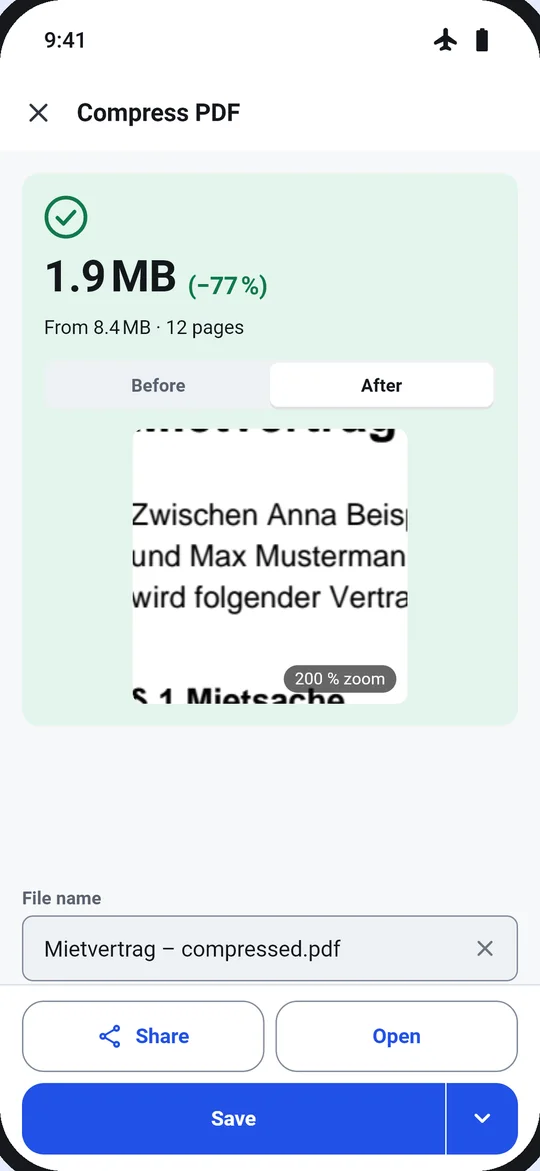
- Recommended · fits≈ 1.9 MB
- Strong · fits≈ 0.9 MB
From 8.4 MB to 1.9 MB in four steps
- 1Choose the file. From Home, Tools, Files, or “Compress with Dokulo” in another app’s share sheet. Pick several to compress them all.
- 2Pick a level or a target. Each level shows its estimate before you start. Greyscale and removing metadata are optional.
- 3Run. Short jobs just finish. A long batch shows its progress; “Keep working” lets you leave, and a notification says when it is done.
- 4Check the result. “1.9 MB (−77 %) · From 8.4 MB” with a before and after zoom. Saved as a copy, so the original stays as it was.
Options
- Level
- Light · Recommended · Strong
- Target size
- Under 1 MB · Under 2 MB · Under 5 MB · Custom
- Greyscale
- Optional, for smaller files
- Remove metadata
- Optional
- Files
- Up to 500 at once
Next
The result card suggests the next tool, so jobs chain without going back.
Questions
Is my PDF uploaded to compress it?
No. Compress PDF runs on your phone, in airplane mode too. Dokulo has no server for files.
What if the target size can’t be reached?
Dokulo tells you the smallest size it can reach, for example “Smallest possible: 2.4 MB”, and asks before saving.
Is there a limit on file size or pages?
No size, page or daily limits, and no watermark. You can compress up to 500 files at once.
Is the original changed?
Not unless you choose “Replace original”. Then the original is kept in Versions for 30 days.