Black out (redact)
Removed, not covered. And checked.
Black out finds IBANs, tax IDs, emails, phone numbers and dates of birth. The text under the boxes is removed from the new file, and the file is checked afterwards.
- On this phoneProcessed on this phone
- Airplane modeWorks in airplane mode
- No limitsNo size, page or daily limits
- Pro · try it once on a real file · €9.99 one-time
- Found for you
- 9 found
- Suggested by AI
- Unticked
“Verified: no hidden text left.”
A black box drawn over text can be copied out from under it. Dokulo removes the text itself, then checks the new file. If the check fails, nothing is saved.
- 1 Find · 2 Review · 3 Apply
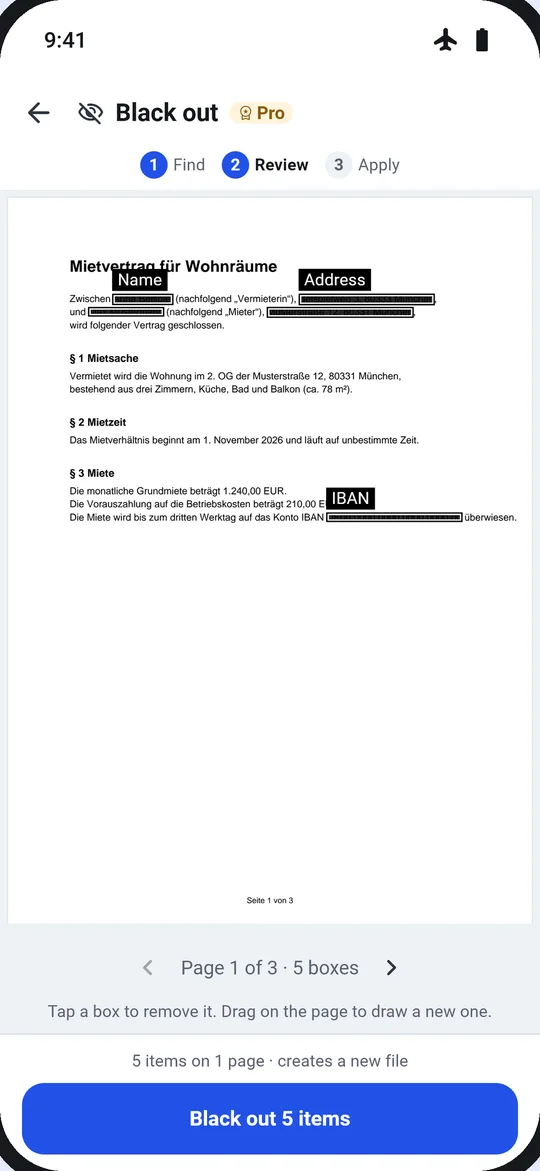
- Found values are shown masked: “DE89 •••• •••• •••• 3000”
- Names and addresses suggested by AI stay unticked until you check them
Sensitive data gone, in three steps and a check
- 1Choose the file. From Home, Tools, Files, or “Black out with Dokulo” in another app’s share sheet.
- 2Find. IBAN, tax ID, email, phone and date of birth are found; search any text or draw a box.
- 3Review. Boxes on every page. Tap one to remove it, drag to add one.
- 4Apply. “Black out 14 items?” The text is removed for good in the new file, and checked.
Options
- Found for you
- IBAN · Tax ID · Email · Phone · Date of birth
- Suggested by AI
- Names and addresses, unticked
- Your own
- Find text to black out · Draw a box
- Check
- The new file is verified; if it fails, nothing is saved
Next
The result card suggests the next tool, so jobs chain without going back.
Questions
Is my file uploaded?
No. Black out runs on your phone, in airplane mode too. Dokulo has no server for files.
Can the text be recovered from the new file?
No. It is removed, not covered, and Dokulo checks that no hidden text is left before saving.
What if the check fails?
“Redaction couldn’t be verified. Nothing was saved.” Your original stays as it was.
Do I need Pro?
You can run it once on a real file and keep the result. After that, Pro unlocks it for good: €9.99, one-time, no subscription.